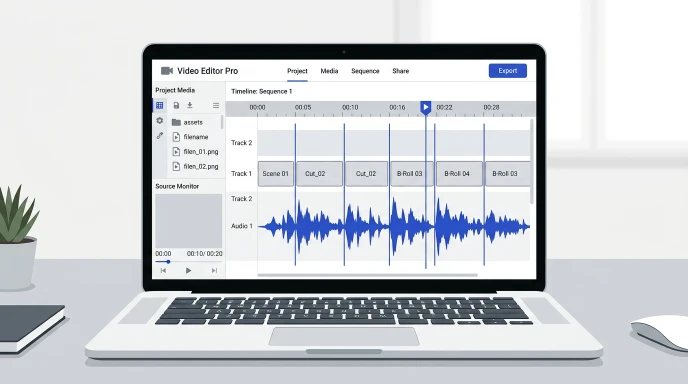
Your cuts almost land on the beat. Almost isn’t good enough. Off-beat edits make a video feel sloppy, even if viewers can’t say why.
What Is the Fastest Way to Sync Edits to a Beat?
Find the exact BPM of your track first. Then calculate the millisecond timing between beats and place your cuts on those points.
What Does It Mean to Sync Edits to the Beat?
Syncing edits to the beat means timing your cuts, transitions, or effects to the music’s pulse.
A cut on the beat feels intentional. A cut slightly off feels random, even by a few frames.
Editors use this trick in music videos, montages, trailers, and short-form content. It’s one of the fastest ways to make raw footage feel polished.
Think of a quick cut montage. If every cut lands on the beat, the pacing feels natural. Miss the beat by even a few frames, and viewers sense something is off, even without knowing why.
How Do You Actually Sync Cuts to a Beat?
Start with the tempo, not the waveform.
Step 1: Get the exact BPM of your track.
Step 2: Convert the BPM into millisecond timing for beats, half-beats, and bars.
Step 3: Place your cuts on those exact timestamps in your timeline.
Step 4: Fine-tune by ear, since transients don’t always land perfectly on the grid.
Working from real numbers beats eyeballing a waveform every time.
Common Cut Points by Beat
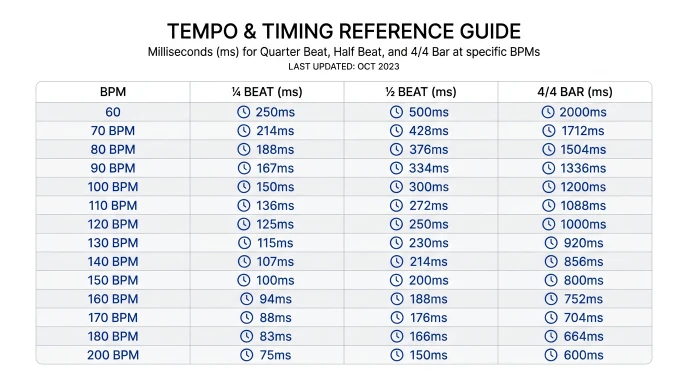
Here’s how beat timing breaks down at a few common tempos.
| BPM | Quarter Beat (ms) | Half Beat (ms) | Full Bar (ms) |
|---|---|---|---|
| 90 | 667 | 333 | 2667 |
| 120 | 500 | 250 | 2000 |
| 128 | 469 | 234 | 1875 |
| 140 | 429 | 214 | 1714 |
| 170 | 353 | 176 | 1412 |
Use these numbers as starting points for cut placement, then adjust to match the actual transients in your track.
Tips for Cleaner Song Syncing
Snap or quantize your timeline to the beat grid if your editor supports it. Most modern tools do.
Cut on the transient, not just the numeric beat. The two are close but rarely identical.
Leave a few frames of buffer before hard cuts. This keeps quick cuts from feeling rushed.
Sync your first cut to the downbeat. Every following cut gets easier once that anchor is set.
Group similar clips by energy level. Fast cuts suit high-energy sections, longer holds suit slower ones.
Common Mistakes to Avoid
Don’t guess the BPM by eye. A wrong tempo throws off every cut that follows.
Don’t ignore your frame rate. Beat timing in milliseconds needs rounding to match your project’s frames.
Don’t forget playback latency. Some software adds a small delay that shifts your perceived sync.
Don’t sync every single cut to the beat. Constant on-beat cutting can feel mechanical instead of natural.
Don’t skip a final playback check at full speed. Sync that looks right in the timeline can still feel off in real time.
Use BPM Finder to Nail Your Sync Points
Manually counting beats across a whole track wastes editing time.
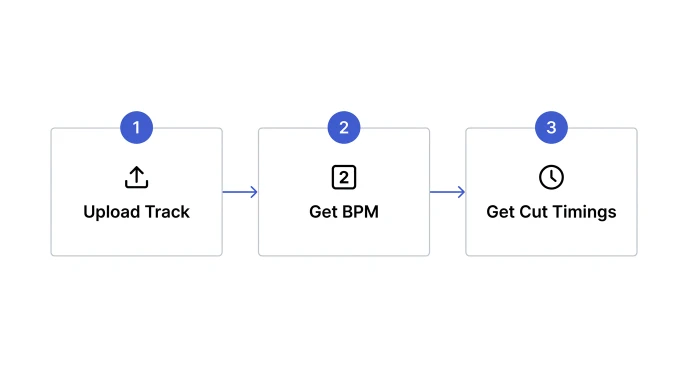
Upload your track to our BPM Finder to get an exact tempo reading in seconds. It runs in your browser, so your files stay private.
Once you have the BPM, use our Delay Calculator to convert it into exact millisecond timings for quarter beats, half beats, and bars. Drop those numbers straight into your timeline.
Want to practice hearing the beat before you edit? Our Metronome helps you internalize the pulse at any BPM. For more on getting an accurate reading in the first place, check our guide on how to find the BPM of a song.
What are useful tricks for syncing video edits to music?
Start with the exact BPM instead of guessing. Convert it into millisecond beat timings, snap your timeline to that grid, then fine-tune each cut by ear. Anchoring your first cut to the downbeat makes every following cut easier to place.
How do you sync cuts to the beat in video editing?
Get the track’s BPM, then calculate the time between beats in milliseconds. Place your cuts at those timestamps on your timeline. Adjust slightly for the actual transient sounds, since they don’t always land exactly on the numeric beat.
Why do my edits feel off-beat even when I count the beats?
Manual counting is rarely frame-accurate. A single missed beat throws off every cut after it. Using an exact BPM reading and calculated timestamps removes that guesswork and keeps every cut consistent.
Can I sync edits without knowing the song’s BPM?
You can tap along and estimate it, but accuracy drops fast over a full track. Getting the exact BPM first makes every later step, from cut placement to transitions, far more reliable.
What’s the easiest way to find exact beat timings for cuts?
Detect the BPM with a browser-based tool, then convert it to millisecond values for quarter beats and bars. This turns tempo into exact numbers you can drop straight into your editing timeline.
Quick Takeaway
Great song syncing starts with an accurate BPM, not a guess. Get the number, calculate your beat timings, then fine-tune by ear.
Try our free BPM Finder and get your next edit locked to the beat.
Leave a Reply